Seedance 2.0 launched on February 10, 2026 and immediately became the most talked-about AI video generator in the world. But accessing it has been anything but straightforward. ByteDance's own cloud platform briefly offered free testing before pulling it due to copyright controversy, the international version of Dreamina hasn't integrated the 2.0 model yet, and the most feature-complete access still requires a Chinese account.
This guide covers every working method as of mid-February 2026, ranked by accessibility for international users. The situation is evolving fast — we update this page as access changes.
Last updated: February 18, 2026. Seedance 2.0 is currently deactivated on all public platforms. Third-party providers (Kie AI, Dzine AI, WaveSpeed) that briefly offered access have disabled the model. BytePlus Playground was removed earlier. The only confirmed way to access Seedance 2.0 right now is through Dreamina's Creative Partner Program (CPP), which is invite-only. The methods below document the full history of access options — some may return as the situation evolves.
Quick Comparison: All Access Methods
| Method | Region | Cost | Status | Best For |
|---|---|---|---|---|
| Dreamina CPP | International | Free (invite-only) | ✅ Active | Only current way to access 2.0 |
| Third-Party Platforms | International | Free credits / Pay-per-use | ❌ Deactivated | Were available briefly, now offline |
| Jimeng | China | ~$9.60/month (1 RMB trial) | ❌ Deactivated | Was the most complete option |
| Little Skylark | China (iOS) | Free (1,200 + 120 daily credits) | ❌ Deactivated | Was best free option |
| Doubao App | China | Free (10/day, beta) | ❌ Deactivated | Was mobile-only, restricted |
| VolcEngine | China | Enterprise | ❌ Deactivated | Enterprise testing paused |
| Dreamina / CapCut | International | Free 800s trial | ⚠️ Seedance 1.x only | 2.0 available via CPP only |
| BytePlus Playground | International | Was free | ❌ Removed | Removed shortly after launch |
1. Dreamina Creative Partner Program (Only Current Access)
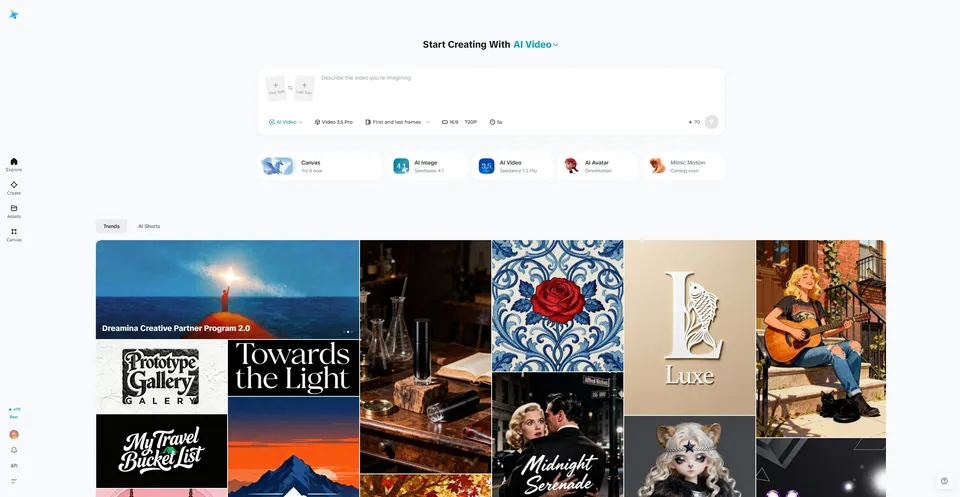
As of February 18, 2026, the only confirmed way to access Seedance 2.0 is through Dreamina's Creative Partner Program (CPP). This is an invite-only program where selected creators get early access to Seedance 2.0 and Seedream 5.0 within the Dreamina platform.
How to Get In
- Apply through the official Dreamina platform
- Invitations appear to go to active Dreamina users and creators with established portfolios
- There's no public application form — it seems to be purely invite-based
Creators who have received CPP access report getting full Seedance 2.0 and Seedream 5.0 capabilities within the Dreamina interface. If you're a Dreamina user, keep an eye on your inbox and notifications.
Verdict: This is the only working access point right now. If you don't have an invite, the best strategy is to sign up for Dreamina, start using Seedance 1.x, and wait for either a CPP invite or the broader public rollout.
2. Third-Party Platforms (Currently Deactivated)
Third-party platforms were briefly the most practical way for international users to access Seedance 2.0 in the days after launch. However, all known providers have deactivated the model as of mid-February 2026. The platforms below may reactivate access in the future — we'll update this page when they do.
Verified Providers
| Platform | Type | Cost | Best For |
|---|---|---|---|
| Kie AI | API + Web | Free credits on signup | Developers, API integration |
| Dzine AI | Web platform | Free trial, then paid | Creators wanting Seedance 2.0 + other AI models in one place |
| WaveSpeed AI | REST API | Pay-per-use | Production workflows, no cold starts |
How to Choose
- Kie AI is the easiest starting point — free credits, straightforward API, and a web interface for non-developers. They offer Seedance 2.0 with full multimodal support (text + image + video + audio inputs).
- Dzine AI integrates Seedance 2.0 alongside other image and video models, making it useful if you want to combine tools without juggling multiple platforms.
- WaveSpeed AI is an exclusive ByteDance API partner with production-grade REST endpoints. Best for developers building Seedance into their own applications.
Caution
Warning: Some sites claiming Seedance 2.0 access are actually running Seedance 1.5 Pro endpoints. Verify the model version before paying. If the output lacks native audio or maxes out at 10 seconds, you're likely not using the real 2.0 model. Stick to the verified providers listed above.
Verdict: Not available right now, but these platforms were the most accessible option during the brief window when the model was live. Worth bookmarking for when access returns.
3. Jimeng (Currently Deactivated)
Jimeng is the Chinese version of Dreamina and currently offers the most complete Seedance 2.0 experience, including features that haven't reached any other platform yet. If you have access to a Chinese phone number, this is the most powerful option available.
How to Access
- Visit jimeng.jianying.com or download the mobile app
- Log in with a Douyin account (requires a +86 Chinese phone number)
- Go to Generate → Video Generate
- Select "Doubao-Seedance-2.0" from the model dropdown
- Switch to "All-Round Reference" mode for advanced multimodal features
What You Get
- Full 15-second generation at 2K resolution
- All-Round Reference mode with up to 12 multimodal inputs
- The full @ reference tagging system for precise asset control
- Commercial licensing included with paid plans
- New users can unlock the model via a 1 RMB trial (~$0.14)
- Daily free login points (~260 initial) allow limited free generation
Limitations
- Requires a Douyin account (Chinese phone number needed)
- Severe queue congestion — free users often wait 2+ hours during peak times
- Realistic human face uploads are strictly prohibited (deepfake prevention)
- Standard membership: 69 RMB/month (~$9.60 USD)
Verdict: Was the most powerful option available. When it reactivates, it will likely remain the best choice for professional creators who need commercial licensing, 2K resolution, and the full multimodal feature set.
4. Little Skylark / Xiao Yunque (Currently Deactivated)
Little Skylark is often described as the "backdoor" free access route to Seedance 2.0. It's currently in a user-growth phase, which means generous free credits — but this promotion won't last forever.
How to Access
- Search "Xiao Yunque" (or "Little Skylark") in the iOS App Store
- Download and install the app (may require a Chinese App Store account)
- Register to receive 1,200 signup credits + 120 daily credits
- Navigate to the video generation tab
- Important: Manually select Seedance 2.0 from the model dropdown — the default may be an older version
Credit Math
At roughly 10 credits per second of video, your daily 120 credits give you approximately 12 seconds of free video generation per day. The 1,200 signup bonus provides an additional ~120 seconds to start with. A "Zero Point Deduction" promotion is sometimes active, which means free generations during promotional periods.
Limitations
- iOS only — may require a Chinese App Store account to download
- Interface is entirely in Chinese
- No commercial usage rights on free-tier outputs
- Standard generation only (no advanced All-Round Reference features)
- The free promotion could end without notice
Verdict: Was the best genuinely free option. If Little Skylark reactivates Seedance 2.0, the credit math works out to a reasonable amount of daily testing.
5. Doubao App (Currently Deactivated)
ByteDance's AI assistant app has Seedance 2.0 integration, but it requires manual beta approval through the Feishu (Lark) enterprise ecosystem — making it the most restrictive method and virtually inaccessible to users outside the Chinese corporate ecosystem.
How to Access
- Download and open the Doubao App
- Go to Settings and copy your User ID (UID)
- Join the official Feishu (Lark) beta group
- Submit your UID for approval (typically 1–2 business days)
- Once approved, access Seedance 2.0 within the app
What You Get
- 10 free generations per day
- 5 or 10-second clips
Limitations
- Requires manual beta approval (1–2 day wait)
- Limited to short clips only (no 15-second generation)
- Requires a Feishu/Lark account within the Chinese ecosystem
- Severe server congestion during peak hours
- No commercial rights
Verdict: Only worth the effort if the other Chinese methods aren't working for you. The approval process and clip length limitations make this the least practical option.
6. VolcEngine Experience Center (Currently Deactivated)
ByteDance's Chinese cloud platform (the domestic counterpart to BytePlus) offers Seedance 2.0 through its Experience Center console. This is primarily aimed at enterprise users evaluating the model for business integration.
How to Access
- Visit the VolcEngine (Volcengine) console
- Navigate to the Experience Center or model playground
- Select "doubao-seedance-2.0" from the model dropdown
- Configure prompt and parameters, then generate
Limitations
- Enterprise-focused — no consumer-friendly interface
- May require a Chinese business account
- API invocation may be paused during certain periods
Verdict: Best for enterprise developers evaluating Seedance 2.0 for integration. Not practical for casual testing.
7. Dreamina / CapCut (Seedance 1.x, 2.0 via CPP Only)
Dreamina is ByteDance's official AI creative platform and will be the primary international gateway to Seedance once the full global rollout happens. However, as of mid-February 2026, Dreamina has not integrated Seedance 2.0 yet — it still offers Seedance 1.x for video generation.
Current Status
- Dreamina offers 800 seconds of free video generation for new accounts (valid 30 days)
- The video generation tool uses Seedance 1.x models
- Seedance 2.0 integration is expected but no confirmed date has been announced
- The platform has added new features including storyboard generation, smart edits, and AI media generation per scene
Pricing
| Plan | Price | Credits |
|---|---|---|
| Free | $0 | ~150 daily + 800s trial (30-day expiry) |
| Basic | ~$18/month | 1,010 credits, no watermark, 60 FPS |
| Standard | ~$42/month | 4,040 credits |
| Advanced | ~$84/month | 13,110 credits, priority processing |
Verdict: Worth signing up for the free 800s trial to use Seedance 1.x while waiting. When Seedance 2.0 integration happens, Dreamina will likely become the go-to platform for international users. Check our Prompt Guide for templates that work across both versions.
8. BytePlus ModelArk Playground (Removed)
BytePlus was initially the fastest way to try Seedance 2.0 for international users. The web-based Playground offered free generations with no account required. However, Seedance 2.0 has been removed from the BytePlus website as of mid-February 2026.

What Happened
BytePlus briefly offered Seedance 2.0 through its ModelArk Playground for a few hours around the February 10 launch. Users could generate 8 free videos at 1080p/15s with no login required. The model was subsequently removed — likely connected to the copyright controversy that erupted days later when Hollywood studios and SAG-AFTRA responded to viral AI-generated content using celebrity likenesses and copyrighted IP.
The BytePlus Playground may return when the situation stabilizes. We'll update this page if and when it becomes available again.
What's Coming Next
The original announcement mentioned a full global launch around late February 2026, but the Hollywood copyright controversy and feature suspensions have created uncertainty around the timeline. Here's what we expect:
- Dreamina integration — Seedance 2.0 on Dreamina for international users (date TBD)
- BytePlus API relaunch — Official API access for developers (was expected Feb 24, now uncertain)
- CapCut integration — Direct Seedance 2.0 generation within the CapCut editor
- Feature restoration — Human Reference input and voice-from-photo features are currently disabled and may return with stricter safety controls
A Few Things to Know
What's the only way to access Seedance 2.0 right now?
As of February 18, 2026, the only confirmed way to access Seedance 2.0 is through Dreamina's Creative Partner Program (CPP), which is invite-only. All public platforms — including third-party providers, Jimeng, and BytePlus — have deactivated the model.
Is Seedance 2.0 available on Dreamina?
Only for CPP (Creative Partner Program) members. The general Dreamina platform still uses Seedance 1.x for video generation. A broader public rollout is expected but no date has been confirmed.
Why was Seedance 2.0 deactivated everywhere?
The deactivation is connected to the copyright controversy that erupted after launch, involving Disney, Paramount, SAG-AFTRA, and the Motion Picture Association. ByteDance appears to have pulled access across all platforms while they work on stricter content controls.
Will Seedance 2.0 come back?
Almost certainly yes, but the timeline is unclear. ByteDance has too much invested in this technology to abandon it. The model will likely return with stricter safety controls for human likenesses and copyrighted content.
Can I use Seedance 2.0 outputs commercially?
When access returns, commercial use will likely require a paid plan on Jimeng or Dreamina. Free-tier outputs typically do not include commercial licensing.
What features are currently disabled?
Beyond the general access shutdown, ByteDance has also suspended the "Face-to-Voice" feature and disabled Human Reference input for real faces. These were removed after privacy and deepfake concerns. They may return with stricter verification controls.
What should I do while waiting for Seedance 2.0?
Sign up for Dreamina and start using Seedance 1.x to learn the platform. When 2.0 becomes available, you'll already know the interface and workflow. Active Dreamina users may also have a better chance of receiving a CPP invite.
For a complete overview of what Seedance 2.0 can do, read our full Seedance 2.0 guide. To start creating immediately, check the Prompt Guide for templates optimized for the model.